 macOS · Personal Project
A lightweight personal notepad,
right on your desktop.
No browser, no account required. A quiet notepad that saves everything locally. Open it quickly and write anything down instantly.
Fully Local
All your notes are stored only on your computer. No server transfers, no accounts, no tracking.
Lightweight & Fast
Pure native app, launches instantly. Not Electron, not a webview.
Simple Writing
One title, one body. Auto-save. No distractions.
Download
- Get
MemoJ.zipby clicking the button below - Unzip it in Finder and move
MemoJ 2.appto yourApplicationsfolder - Double-click to launch
Getting a Gatekeeper warning?
Since this is an unsigned app from an external source, macOS will block it on first launch with the following message:
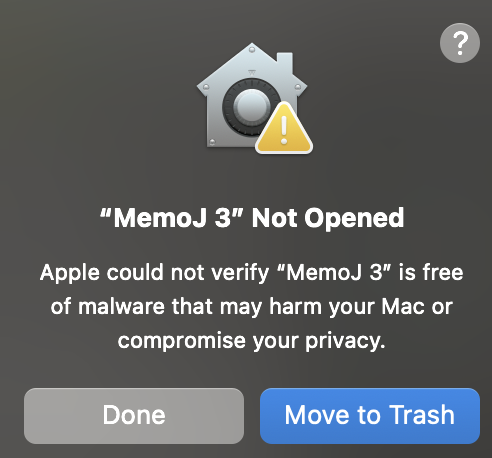
To open the app, click Done, then go to System Settings → Privacy & Security.
Scroll down to the Security section and click Open Anyway next to the blocked message:
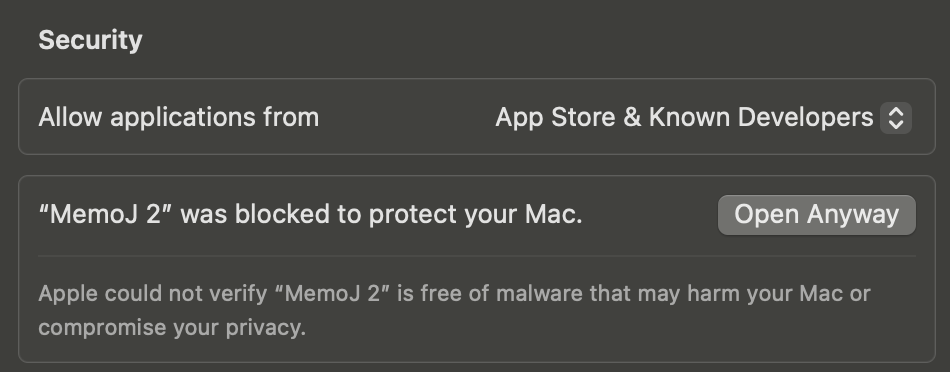
Alternatively, you can instantly bypass this by running this command in Terminal:
xattr -dr com.apple.quarantine "/Applications/MemoJ 2.app"